Monday, January 5, 2009

Events for DUMMIES

Accept it, we all have used events but never really got to know what goes behind the scenes.

So here in vivid little words, I try to throw some light on this.

Here goes my “EVENTS for DUMMIES!”

Flash Player 9 implements an event model based on the World Wide Web Consortium’s (W3C) specification entitled Document Object Model Events available at http://www.w3.org/TR/DOM-Level-3-Events/events.html. According to this document, the lifecycle of an event that deals with display objects consists of three phases: capture, target, and bubbling.

You have probably heard of these names but never got to know why three phases are used??

The reason is simple.W3C recommends so! J

Capture: During this phase, Flash Player makes a first pass to check every object from the root of the display list to the target component to see if any parent component might be interested in processing this event. By default, events are ignored by the parents of the target component at the capture phase. Its like collecting who and all are interested in the a components events.

Ex:

If component 1 has a code like component2.addEventListener(“eventname”,myfunction);

Component 1 will be added to a list in this phase.

Target: At this phase, event object properties are set for the target and all registered event listeners for this target will get this event.

Event.name and event.whatever is set now!

Bubbling: Finally, the event flows back from the target component all the way up to the root to notify all interested parties identified during the capture phase. Not all events have a bubbling phase and you should consult the AS3 language reference for the events you’re interested in.

The three event phases described above don’t apply to the user-defined events because Flash Player 9 doesn’t know about parent-child relations between user-defined event objects. But AS3 developers can create custom event dispatchers, if they want to arrange event processing in three phases.

Hope it helps!

Friday, December 19, 2008

Case insensitive SortCompare Function for Strings

Here is a quick post on how to use the sortCompare function to sort strings.

Here goes the sample.Assuming your dataField is called status.This sortcomparefunction will function insensitive to the case of the strings.

private function statusSortCompareFunction(obj1:Object,obj2:Object):int {

if (!obj1.hasOwnProperty("status")) {

obj1.status = null;

}

if (!obj2.hasOwnProperty("status")) {

obj2. status = null;

}

return ObjectUtil.stringCompare(obj1.status,obj2.status,true);

}

Hope it helps!

Thursday, December 4, 2008

Integrating Spring with Flex on TOMCAT

This is a sequel to my post on getting up and running with blazeds/flex/tomcat on eclipse. This little post is going to explain how to integrate your ultra cool flex front end with the spring framework.Checkout http://www.springframework.org/ if you are not familiar with spring or Dependency injection.

Alright.Here are the steps.

1.Setup your blazeds server and client as mentioned in the previous blog post
2.Download the spring framework from http://www.springframework.org. Extract and move the neccessary jars into WEB-INF/lib folder of your server application.
3. Add the spring context param and listener to your web.xml file:

<context-param>
<param-name>contextConfigLocation</param-name>
<param-value>/WEB-INF/applicationContext.xml</param-value>
</context-param>

<listener>
<listener-class>org.springframework.web.context.ContextLoaderListener</listener-class>
</listener>

4.Download the flex spring factory from www.adobe.com. COmpile it and have the class file inside your WEB-INF/classes folder .

5. Add the following configuration to your WEB-INF/flex/services-config.xml file:

<factories>
<factory id="spring" class="flex.samples.factories.SpringFactory" />
</factories>

6.Define your components in spring's XML file. Given the above spring
configuration, they would be placed in WEB-INF/applicationContext.xml. This
file can contain components which are intended to be exposed to flex clients as
remote objects as well as classes to be used as Flex Data Management Services
(FDMS) assembler implementations using the Java adapter.

7.To be constructed by Spring, your component should have a zero argument constructor so
Spring can construct an instance. Your applicationContext.xml file might look like:

<?xml version="1.0" encoding="UTF-8"?>
<!DOCTYPE beans PUBLIC "-//SPRING//DTD BEAN//EN" "http://www.springframework.org/dtd/spring-beans.dtd">

<beans>
<bean name="weatherBean" class="dev.weather.WeatherService" singleton="true"/>

<bean name="myAssembler" class="dev.assemblers.MyAssembler" singleton="true"/>
</beans>

8.Add your flex destination configuration for the components you want to expose to
flex clients. Since these components use the spring factory we define, we add the
additional tag <factory>spring</factory> and the <source> attribute is used to refer
to the spring component's bean name, not the class name as with the default factory.

For Remote object destinations you place your destinations inside of the
<service> tag which refers to the flex.messaging.services.RemotingService,
(by convention this may be in WEB-INF/flex/remoting-config.xml). For example, your
remote destination configuration might look like:

<destination id="WeatherService">
<properties>
<factory>spring</factory>
<source>weatherBean</source>
</properties>
</destination>

9.Use a simple client and set your remote object destination to the one you created on your remoting-config.xml

10.Restart your server.Test. Off you go!!

Bookmark and Share

Sunday, November 30, 2008

Set up blazeds on tomcat with eclipse for FLEX .

Alright,

This is a quick post on how to setup your first blazeds environment for eclipse on your existing tomcat installation.

By the end of this short tutorial you will be able to have a simple flex page that can call your remote object using blazeds on tomcat.

Note:I use eclipse 3.3 with the flex builder plugin installed. Steps will probably remain the same for flex builder with wtp installed too.

1.Download blazeds from adobe.com. Extract the blazeds.war file onto a folder.I will tell you how to use this in a few steps.

2.Create your tomcat server on eclipse. If you had not added your existing tomcat as a runtime in eclipse , this is a good time to do so.

3.Create a new "Dynamic web project " on eclipse. Call it BlazeAllinOne. Now go back to the folder where you had extracted blazeds.war and copy the META-INF and WEB-INF folders from there to the "Webcontent" folder that eclipse had created in the project. The WEB-INF should include lib,flex,classes,src folders. And most importantly the new web.xml file.

4.Right click on the project and change the build path such that the java classes will be compiled into the classes folder.RightClick->properties->java build path->Source tab.
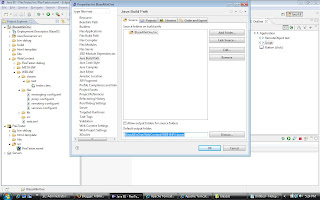

NOtice the "Default output folder" entry that is pointing to the classes folder we copied from blazeds.war

5.Open the services-config.xml file within WEB-INF/Flex folder and change entries from this

endpoint url="http://{host}:{port}/{context-root}/messagebroker/amf" class="flex.messaging.endpoints.AMFEndpoint"

TO

endpoint url="http://localhost:8080/BlazeAllinOne/messagebroker/amf" class="flex.messaging.endpoints.AMFEndpoint"

Note BlazeAllinOne was how my project was deployed. Note.Do not WebContent or anythng after your project's name.

6.Build your project, if you have not set Build-Automatically on the project menu.By this point you have generic blazeds-tomcat setup that can invoke remote objects.

Verify your setup by testing if the amf links are active . Paste the endpoint url you changed on services.xml onto your browser. something like this http://localhost:8080/BlazeAllinOne/messagebroker/amf should return you a blank page and not a 404 or 500 error.

If you get 404 error,Somethings wrong!

Now some clarifications. Why did I create a dynamic web project and copy my blazeds files? Because only of its a DWP , eclipse will deploy it in tomcat container. If you had created a simple java project and pointed to your blazeds WEB-INF folder, eclpse will not deploy the app, everytime you start the server through eclipse.

7.Let us now see how we tie up flex to the server side environment we just created..

8.Create a simple java classes on your blaze-server project .Something like this

package test;

public class tester {
public String getData() {
return "hi";
}
}

9.Build the project again. The test.tester.class file should now be generated within the WEB-INF/classes folder.

10.Open your remoting-config.xml file and create a new destination pointing to the new class.
the entry goes like this

<destination id="testremote">
<properties>
<source>test.tester</source>
</properties>
</destination>

Now Lets create the client

11.NewProject-Flex-select J2ee in application server type.Unselect "Create combined flex/java src folder".Click next

12.Deselect the "Use default location for LCDS " and enter the following.

RootFolder :{youreclipseworkspace}\BlazeAllinOne\WebContent\
Root URL:http://localhost:8080/BlazeAllinOne/
Context_Root:BlazeAllinOne/. Click finish

13.Create a simple mxml and paste this code

<?xml version="1.0" encoding="utf-8"?>
<mx:Application xmlns:mx="http://www.adobe.com/2006/mxml" layout="absolute">
<mx:RemoteObject id="test" destination="testremote">

</mx:RemoteObject>
<mx:Script>
<![CDATA[
import mx.controls.Alert;
import mx.rpc.events.FaultEvent;
import mx.rpc.events.ResultEvent;
private function getData():void {
test.addEventListener(ResultEvent.RESULT,resultHandler);
test.addEventListener(FaultEvent.FAULT,faultHandler);
test.getData();
}
private function resultHandler(eve:ResultEvent):void{
Alert.show(eve.message.body.toString());
}
private function faultHandler(eve:FaultEvent):void{
Alert.show(eve.message.toString());
}

]]>
</mx:Script>
<mx:Button label="click" click="getData()">

</mx:Button>
</mx:Application>

Note:The remote object destination I use is testremote.The one I created in remoting-config.xml file.

14.Build all and restart the server if its neccessary. RIght click on your mxml and select "Run as Flex application"

15.Click on the button. You should be getting a pleasant "hi" from your server setup :-)

16.Note that you can setup break points on flex and java and debug them parallely.

There you go. You have the power of flex,blazeds,tomcat on your hands.

Make the world a better place :-)

Hope it helps!


Bookmark and Share

Tuesday, November 25, 2008

What Adobe Air Should be able to do but does'nt!

Alright, after working with adobe air for sometime, I find myself longing for the following features.


1.Ability to execute system processes -  I do understand that this poses a security riskl, but what the hell.? The user is installing AIR as an administrator after all. Adobe should learn from SUN here and do what java does best. Even though java is meant to be cross platform, it does provide developers with options like JNI API to use native code whenever required.


2.Ability to add options to context menu on file/folder icons – Remember how svn or winzip can add multiple options to context menus that comes when you right click on a file?? This is something I would really love to have in my air application . And no its not there! Cant believe they missed it.


3.AIR can have an API to parse EXCEL/WORD files – What I am trying to say is something like apache POI that helps AIR apps to read and write binary data from files in the files ystem and make sense out of it. Even a bridge between Apache POI and air might do the trick


4.Auto Sync API – Synching the built in sqlite database can be simpler. Some kind of an auto sync api to update the local db will be very helpful .Right now its just possible to detect a change in network connectivity and you are on your own to do what is to be done.


That’s it for now. I will add as soon as I find myself wanting more. Still love AIR/FLEX though! J


Bookmark and Share

Wednesday, November 19, 2008

Flex Specific security considerations

When it comes to security there is no end to what one can do , but the basic techniques that an attacker remains the same. In case of a RIA built with flex, there are a

few important and unique considerations.


  • It’s very very simple to decompile a Flex or Flash file. The file format is public and many decompilers are already in place. The Same can be said about javascript too, but the thing is that with flex based RIA’s a lot of  context and logic is saved on the client side. If you are a fan of saving sensitive data on client side,watch out! Its too easy to know what you are doing on the client.
  • It’s equally easy to monitor requests and results from a Flex app to and from the server. This and the above make it a breeze to get the URI’s and expected parameters for your PHP scripts.Softwarre like ETHEREAL do a great job in finding out what is being sent and received.
  • Most Flex/PHP/JSP architected applications will expect and return clean, simple XML data. This data can be parsed easily to see if any security holes can be exploited.Thats why you will have to seriously consider the binary protocol AMF and start using its implementation in the form of Blazeds.LCDS or AMFPHP


Hope it helps!


Bookmark and Share

Tuesday, November 18, 2008

How to test if an object is of a given type?

When dealing with typeCasting its essential to test if the objects are compatible before having a
typecast statement.Forgetting to do this results in fragile code that might throw a type cast error anytime.
Here is an example that shows you how to test this.
Note:A child is a type of parent and the vice versa is not true.


<?xml version="1.0" encoding="utf-8"?>

<mx:Application

creationComplete="test()"

xmlns:mx="http://www.adobe.com/2006/mxml" layout="absolute">

<mx:Script>

<![CDATA[

import mx.controls.Alert;

import mx.events.CollectionEvent;

import mx.collections.ArrayCollection;

private function test():void {

var parent:Parent = new Parent();

var child:Child = new Child();

if (child is Parent) {

Alert.show("Yes");

} else {

Alert.show("No");

}

}

]]>

</mx:Script>

</mx:Application>

}


Bookmark and Share